Almost a year and a half after the launch of Android Wear, Google just integrated a new icon in the Play Store to better identify applications compatible with Android Wear. It was time.
So far, the most "simple" way to tell if an application is compatible with Android Wear was to install the application and check if an icon appeared on the screen of his watch. Or read the description of the application when the developer talks about the compatibility of the program with the OS, which is not always the case. In short, in the case of commercial applications, it was difficult to navigate.
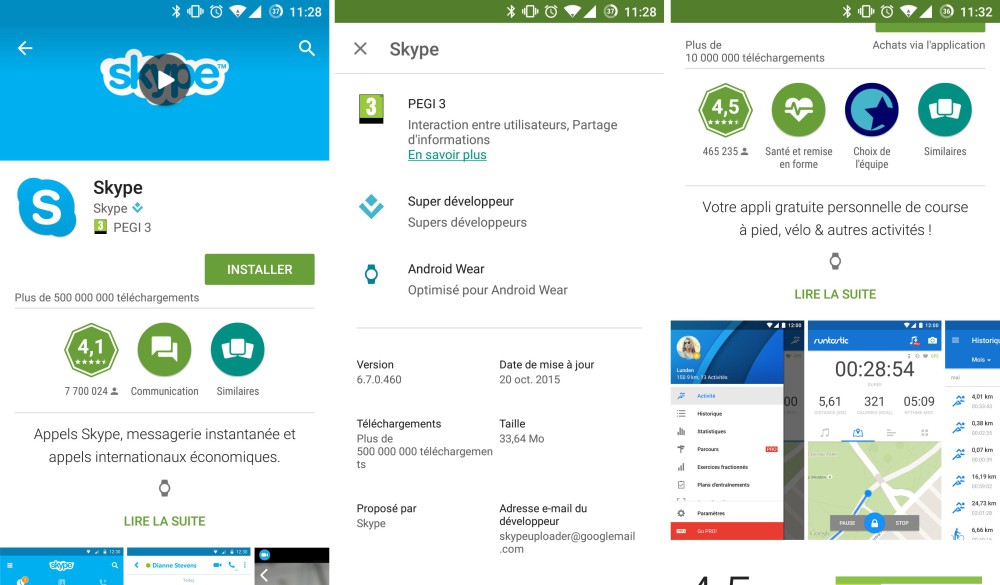
Good news, after more than a year and a half of existence, Google has realized that he could make life easier for its users in the Play Store. For several hours, the applications compatible with Android Wear now display shows a new icon just below the preview description. This icon means "Optimized for Android Wear", and it does not appear (yet?) On the Play Store web version.
It also seems that this icon does not appear yet in all the applications. Maps or Google Hangouts have no icon shows on their record.

No comments:
Post a Comment